Centauri Field Upgrade Instructions
Field Upgrade of the firmware is a very simple process. Centauri has the necessary infrastructure for performing field upgrade of the embedded software.
Download the latest Centauri firmware upgrade package:
Centauri_Ver_502 upgrade(428.7 kB, ZIP) Centauri Field Upgrade Instructions in PDF(429.1 kB, PDF)
- The upgrade package is contained as a folder within a ZIP file. Extract from the ZIP file the folder (called 'centauri_upgrade') and copy this folder to main directory (the root) of a USB flash drive.
Note: The USB flash drive must be up to 32G and formatted as FAT32 - Insert the USB flash drive into the USB port that is found on the upper panel of the meter (see Figure 1).
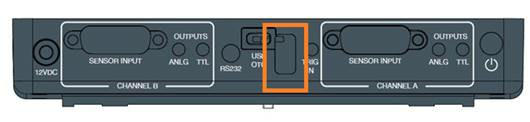
Figure 1: Upper panel of Centauri Meter with USB input highlighted - Insert a pin in the pinhole (see Figure 2) to access the micro-switch.
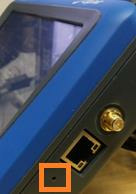
Figure 2 Right side of Centauri Meter with pinhole highlighted - Turn on the Centauri while simultaneously pressing through the pinhole for a few seconds.
- The upgrade procedure starts, with a progress bar displayed on the screen.
- When the procedure is completed, the Centauri restarts with the new firmware version.
Disclaimer:
- The new Centauri firmware is based on a new Android version so once upgraded there is no way back other than loading the instrument with production firmware.
- Upgrade from older version may take over 5 and a half minutes.
- The logs stored in the instrument will be deleted (Save them in a USB disk drive before the instrument is upgraded)