Sorry, this family of products is no longer available.
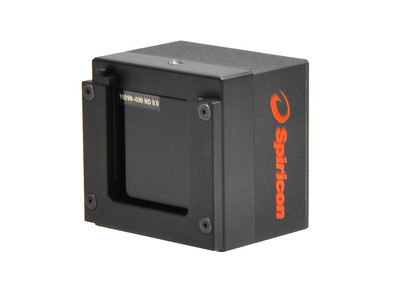
L11059 USB 4008x2672 CCD 190-1100 nm Laser Beam Profiler with BeamGage Software
L11059 USB 4008x2672 CCD 190-1100 nm Laser Beam Profiler with BeamGage Software
The L11059 laser beam profiler accurately captures and analyzes wavelengths from 190 to 1100 nm. It is our largest active area at a 35 mm format, has a wide dynamic range, and unparalleled signal to noise ratio, making it ideal for beam profiling of very large beams.
- 4008 x 2672 pixel resolution with a 9.0 µm pitch
- Programmable high speed electronic shutter
- USB 2.0 communication interface
- 5ֺֺ9 bB true dynamic resolution
- 3ֺֺ5 x 24 mm imager format
- BeamGage Professional Software Included See All Features
Software
BeamGage Professional
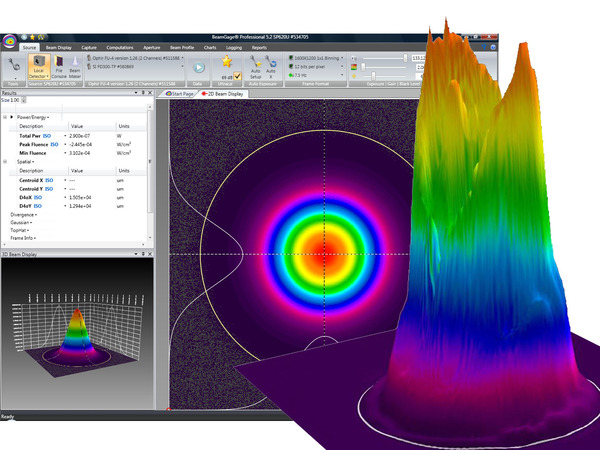
BeamGage Professional has all of the functionality that BeamGage Standard includes. BeamGage Professional supports all of our beam profiling cameras, includes window partitioning to allow analysis of multiple beams on a single camera, and includes an automation interface written in .NET to push data to your custom applications.
Specifications
- Product NameL11059
- Spectral Range190-1100 nm
- Beam Size90 μm to 23.8 mm
- Communication InterfaceUSB 2.0
- Sensor TypeSilicon CCD
- Compatible Light SourcesCW, Pulsed
- Active Area35 x 24 mm
- Elements4008 x 2672
- Effective Pixel Pitch9.0 µm
- Dynamic Range59 dB
- Full Resolution Frame Rate3.1 fps
- Saturation Intensity160 µW/cm2
- SoftwareBeamGage Professional
- CE ComplianceYes
- UKCA ComplianceYes
- China RoHS ComplianceYes
Features
BeamGage® Laser Profiling Software
BeamGage® comes in two versions: Standard and Professional. Each builds off of the next adding additional capability and flexibility as needed for adapting to almost any configuration requirement. The software performs rigorous data analyses on the same parameters, in accordance with the ISO standards, providing quantitative measurement of numerous beam spatial characteristics. Pass/Fail limit analysis for each of these parameters can be also applied.
BeamGage® Software Measurements
- ISO Standard Beam Parameters
- Dslit, Denergy, D4σ
- Centroid and Peak location
- Major and Minor Axis
- Ellipticity, Eccentricity
- Beam Rotation
- Gaussian Fit
- Flat-top analysis / Uniformity
- Divergence
- Pointing stability
Laser Beam Profiler Accessories
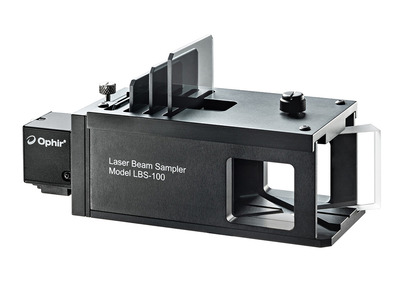
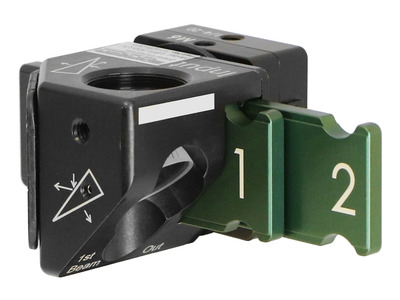
When performing beam profiling measurements on a laser, it is sometimes necessary to manipulate the beam in order to achieve a signal that is suitable to be measured. Occasionally, the beam needs to be sized correctly by either increasing it if it is too small, or increasing it if it is too large. Often times, the laser’s power needs to be reduced to a certain level to be imaged. Our laser beam profiler accessories allow you to achieve proper beam sizes and power levels so that you can achieve the most accurate measurements possible.
Designing Laser Beam with BeamMaker
BeamMaker helps engineers, technicians, and researchers understand a beam's modal content by creating a theoretically generated beam. Design your perfect beam profile in BeamMaker by specifying the mode, size, width, height, intensity, angle, and noise content - then configure your laser to run the as designed, and compare your actual beam to the theoretically derived measurements. The end result is knowledge about how much the real beam varies from the desired beam.
Fundamentals of Laser Measurement & Beam Profiling
Is your laser's beam profile shaped correctly for your application? This video teaches the fundamentals of laser beam profiles and discusses the benefits of profiling your laser beam. Several case studies are presented showing before and after laser beam profiles.
Measuring Laser Focus Spot Size in an industrial Medical Device Application
This step-by-step tutorial will show you how to set up a camera-based beam profiling system on an industrial single-pulse laser welding system. It will also demonstrate for you how to simultaneously analyze the laser's focused spot, measure the laser's energy per pulse, and measure its temporal pulse shape.

Resources
Data Sheets
LT665 L11059 Beam Profiler Datasheet(101.7 kB, PDF)
Drawings & CAD
L11059 Drawing(192.4 kB, PDF)
Manuals
BeamGage User Guide(10 MB, PDF) BeamGage User Guide - Japanese(6.3 MB, PDF) BeamGage User Guide - Chinese(7.3 MB, PDF)
Catalogs
Laser Beam Profilers Catalog (7.6 MB, PDF) Laser Power & Energy Measurement and Laser Beam Analysis Catalog(27.5 MB, PDF)
Application Notes
Videos
1 Introduction to BeamGage Beam Profiling Camera(0:38) 2 Source Tab - Control Acquisition of Laser Data(7:42) 3 Beam Display Tab - Control Display Options(9:21) 4 Capture Tab - Customize Data Collection(7:46) 5 Computations Tab - Adjust Calculations(10:29) 6 Aperture Tab - Define Region of Interest(9:40) 7 BeamGage Charts, Logging and Reports(4:26) 8 BeamGage Setup Configuration(5:04) 9 BeamGage Beam Width Calculations(2:25) 10 BeamGage Ultracal and Apertures(5:35) 11 BeamGage Camera Resolution(4:15) 12 BeamGage Weak Beam Strategies(2:03) 13 BeamGage Tips and Tricks(4:41) 14 BeamGage Camera Setup Example(12:52) BeamGage Tutorial: Automation(10:29) BeamGage Tutorial: Beam Attenuation(4:25) BeamGage Tutorial: Camera Quick Start(3:41) BeamGage Tutorial: Getting Started with BeamGage(17:04) BeamGage Tutorial: Help System(3:28) BeamGage Tutorial: Power/Energy Measurement Integrated(5:44) BeamGage Tutorial: Spot Size and Divergence(7:52) BeamGage Tutorial: Tabs and Ribbons(13:23) BeamGage Tutorial: Ultracal(3:33)
Technical Notes
Integrated Solutions Using the built in photodiode trigger on the SP620U and SP503U cameras BeamGage Profiling with .Net Automation Interface and LabVIEW® The Focal Length Divergence Measurement Method BeamGage Professional Partitions with Multiple Beams on One Display Measurement of Mode Field Diameters of Tapered Fibers and Waveguides for Low Loss Components Beam Width Measurement Accuracy Understanding Dynamic Range…The Numbers Game
Technical Articles
LIDAR Guns, Accuracy, and Speeding Tickets VCSEL Measurement Solutions Imaging UV light with CCD Cameras Which Camera Technologies Work Best for Beam Profiling Applications, Part 2: Baseline Methods and Mode Effects Which Camera Technologies Work Best for Beam Profiling Applications