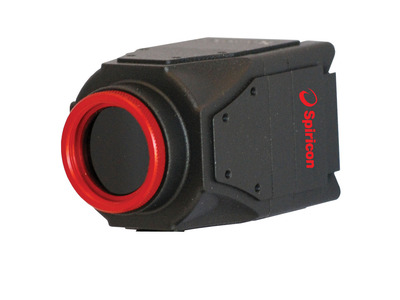
LT665-1550 USB 2752x2192 CCD 1440-1605 nm Laser Beam Profiler with BeamGage Software
LT665-1550 USB 2752x2192 CCD 1440-1605 nm Laser Beam Profiler with BeamGage Software
The LT665-1550 laser beam profiler accurately captures and analyzes wavelengths from 1440 to 1605 nm. It features a compact design, wide dynamic range, unparalleled signal to noise ratio, and a 1 inch format that makes it ideal for large beam NIR laser and telecom mode field analysis.
- 2752 x 2192 pixel resolution with a 60 µm pitch
- Adjustable Gain levels and programmable electronic shutter
- USB 3.0 communication interface
- BeamGage Standard or Professional software included See All Features
Software
BeamGage Standard
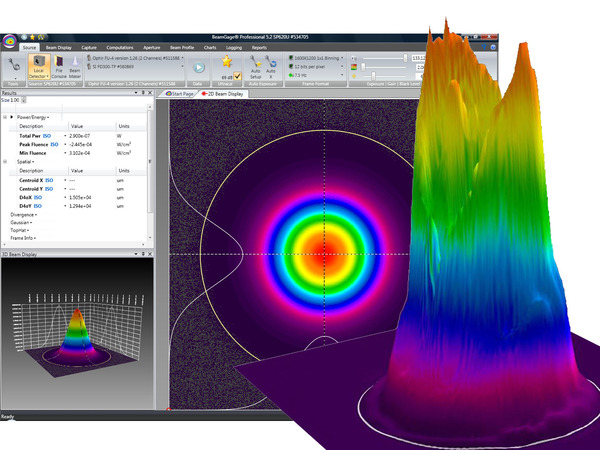
BeamGage Standard is our full-function software with an extensive set of ISO quantitative measurement, our patented UtraCal™ algorithm for the highest accuracy measurements in the industry.
BeamGage Professional
BeamGage Professional has all of the functionality that BeamGage Standard includes. BeamGage Professional supports all of our beam profiling cameras, includes window partitioning to allow analysis of multiple beams on a single camera, and includes an automation interface written in .NET to push data to your custom applications.
Specifications
- Product NameLT665-1550
- Spectral Range1440-1605 nm
- Beam Size0.6 to 9.8 mm
- Communication InterfaceUSB 3.0
- Sensor TypePhosphor-Coated Silicon CCD
- Compatible Light SourcesCW, Pulsed
- Active Area12.5 x 10.0 mm
- Elements2752 x 2192
- Effective Pixel Pitch60 μm
- Dynamic Range~30 dB
- Full Resolution Frame Rate27 fps
- CE ComplianceYes
- UKCA ComplianceYes
- China RoHS ComplianceYes
Features
BeamGage® Laser Profiling Software
BeamGage® comes in two versions: Standard and Professional. Each builds off of the next adding additional capability and flexibility as needed for adapting to almost any configuration requirement. The software performs rigorous data analyses on the same parameters, in accordance with the ISO standards, providing quantitative measurement of numerous beam spatial characteristics. Pass/Fail limit analysis for each of these parameters can be also applied.
BeamGage® Software Measurements
- ISO Standard Beam Parameters
- Dslit, Denergy, D4σ
- Centroid and Peak location
- Major and Minor Axis
- Ellipticity, Eccentricity
- Beam Rotation
- Gaussian Fit
- Flat-top analysis / Uniformity
- Divergence
- Pointing stability
Laser Beam Profiler Accessories
When performing beam profiling measurements on a laser, it is sometimes necessary to manipulate the beam in order to achieve a signal that is suitable to be measured. Occasionally, the beam needs to be sized correctly by either increasing it if it is too small, or increasing it if it is too large. Often times, the laser’s power needs to be reduced to a certain level to be imaged. Our laser beam profiler accessories allow you to achieve proper beam sizes and power levels so that you can achieve the most accurate measurements possible.
Designing Laser Beam with BeamMaker
BeamMaker helps engineers, technicians, and researchers understand a beam's modal content by creating a theoretically generated beam. Design your perfect beam profile in BeamMaker by specifying the mode, size, width, height, intensity, angle, and noise content - then configure your laser to run the as designed, and compare your actual beam to the theoretically derived measurements. The end result is knowledge about how much the real beam varies from the desired beam.
Fundamentals of Laser Measurement & Beam Profiling
Is your laser's beam profile shaped correctly for your application? This video teaches the fundamentals of laser beam profiles and discusses the benefits of profiling your laser beam. Several case studies are presented showing before and after laser beam profiles.
Measuring Laser Focus Spot Size in an industrial Medical Device Application
This step-by-step tutorial will show you how to set up a camera-based beam profiling system on an industrial single-pulse laser welding system. It will also demonstrate for you how to simultaneously analyze the laser's focused spot, measure the laser's energy per pulse, and measure its temporal pulse shape.
Frequently Asked Questions
- Regarding dead or bad pixels in the imager array: Will my camera have any bad pixels, do they affect my laser profile measurement, and can they be corrected and how? can they be corrected and how? Answer
Camera Defects Policy
Ophir-Spiricon, LLC (OSL) is a supplier of laser beam analysis tools that employ commercial-industrial solid-state cameras. OSL attempts to supply cameras with as few pixel defects as possible. OSL tests for and corrects defective pixels that may have an adverse effect when used for its intended purpose. OSL does not guarantee that a supplied camera will be defect free, or that they will remain defect free during its normal lifetime and under normal use.
It is not uncommon for modern megapixel camera imagers to develop point defects as they age, even when not subjected to abuse. Imagers without windows often experience point defects at rates typically greater than imagers with their cover glass left in place. Point defects can also appear more frequently when operating at higher rather than lower ambient temperatures, and higher relative humidity. Such defects can occur even when the camera is in storage and not being used.
Cameras supplied by OSL will be certified for use in laser beam analyzer applications. When defects occur, the ability to make certain measurements under certain conditions may be compromised. However, depending upon the nature of the defect, most measurement can still be performed without loss of accuracy. In some instances the effects of defects can be eliminated or significantly reduced by adjusting the manner in which the camera is being employed.
Ophir-Spiricon, LLC offers a camera recertification service. This service can help to extend the useful life of your camera and correct some point defects that may show up over time. This service can not correct cameras with serious laser damage or imager degradation. Whenever possible OSL will restore the camera to our "as new" level of certification; and if not possible, we will indicate to the user how to avoid areas of the imager that may not perform to "as new" standards.
Defects, Solutions and Workarounds
The following list contains examples of typical camera point defects that may occur over time, and suggested methods of compensating for them if they are troublesome:Defect type Description of the Problem Recommended Solution
See Note 1 belowBright Pixel Pixels with this defect will indicate being illuminated even when no signal is present. These are the most troublesome when attempting to make accurate peak fluence and peak fluence location measurements because they represent a false signal. Most other measurements are not adversely affected by this type of defect. This type of defect is screened for during our regular camera inspection process. All pixels that exceed a set limit are corrected, if possible, before the camera ships. See Note 1 below. Our QA department will often reject cameras if the pixel can not be corrected and it exceeds our acceptance criteria. - Ultracal/baseline correction will subtract out the defective pixel.
- Reposition the camera to remove the defective pixel from the measurement region and employ a manual aperture to isolate the pixel from the area of interest.
- Return the camera to OSL to have the bad pixel corrected and the camera re-certified.
Twinkling Pixel This is an intermittent version of the Bright Pixel defect. These often appear as the camera warms up. May disappear if the camera is run in cooler environments. Usually predicts a pixel that will soon be a permanently bright pixel defect.
These are the hardest to detect and as such may get past our camera inspection process.Same as above.
If returned to OSL to be corrected please send a full frame data file showing the pixel as it is malfunctioning. This will aid in our ability to find and fix it.Dark Pixel Dark pixels have low responses compared to the amount of illumination that they receive. Isolated instances of these types of defects do not pose a serious beam analysis problem and they are generally not in need of correcting. This type of defect will not significantly impact a beam measurement result unless the beam is very very small and the defect falls inside of the beam profile. Reposition the camera to remove the defective pixel from the measurement region. Dead Pixel Dead pixels have no response at all and may output a raw pixel value of zero (0) counts. This type of defect is screened for during our regular camera inspection process. All pixels that exceed a set limit are corrected, if possible, before the camera ships. This type of pixel may create a warning message when performing Ultracal operations. Ignore the warning and proceed as in the Dark Pixel case described above. Dark Clusters These dimmer than normal clusters involving about a dozen or fewer pixels are often caused by dust particles and can usually be removed by cleaning of the imager. Sometimes these can be very difficult to impossible to remove. In the latter case they are may be melted into imager
If this is the result of laser damage then imager replacement is the only solution.These usually do not cause serious measurement problems and can be treated with the Dark Pixel workaround described above. They can sometimes be dislodged with very gentle puffs of dry air. If you return a camera to be re-certified we have a few special methods for cleaning these, but success is not 100% guaranteed. Regions of non-uniform response When large areas of an imager yield reduced signal levels this usually indicates laser damage. Long term exposure to ultraviolet radiation or overexposure to high laser power or peak energies are common causes. This type of degradation is not repairable and either the camera or the camera imager must be replaced.
Note 1: The following camera models can be re-certified and can have bad pixels corrected:
GRAS20, SP620, L11058, L230, Pyrocam III, Xeva
Each of the above cameras will have a maximum number of pixels that can be corrected. Once this limit is exceeded the camera imager or the camera must be replaced in order to meet OSL "as new" certification standards. If a large cluster of defective pixels appear, then bad pixel correction may not be able to repair the defect. The following cameras do not have, or have very limited, bad pixel correction capabilities:
SCOR20, SP503, FX50, FX33, FX33HD - How come I can't use the Cameras Region Of Interest (ROI) Feature in my SP503U or SP620U Camera?Answer
The initial release of the SP503U and SP620U cameras did not have the ROI feature enabled. Those cameras that do not have the ROI feature enabled will need to be returned for upgrading both hardware and firmware, and the latest version of software will need to be installed, which is available at;
https://www.ophiropt.com/laser-measurement-instruments/beam-profilers/services/software-download - Why is an anti-reflection coated window required with the Pyrocam III?Answer
The Pyrocam III needs a window for protection against foreign objects entering the camera, and destroying the crystal. This could happen by someone poking a brush or Q-tip to clean off lint, etc. The window also protects the sensor from the effects of humidity. The window must have anti-reflection coating, or the two surfaces of the window will create interference fringes from a collimated light source which show up on the sensor as ripples in the beam. With anti-reflection coating the reflections, and thus the interference fringes, are minimized, and the sensor sees only the beam energy.

Resources
Data Sheets
Phosphor Coated CMOS CCD Cameras For NIR Response Datasheet (158.5 kB, PDF) BeamGage Datasheet (647.6 kB, PDF)
Drawings & CAD
LT665-1550 Drawing(483.1 kB, PDF)
Manuals
BeamGage User Guide(10 MB, PDF) BeamGage User Guide - Japanese(6.3 MB, PDF) BeamGage User Guide - Chinese(7.3 MB, PDF)
Catalogs
Laser Beam Profilers Catalog (7.6 MB, PDF) Laser Power & Energy Measurement and Laser Beam Analysis Catalog(27.5 MB, PDF)
Videos
1 Introduction to BeamGage Beam Profiling Camera(0:38) 2 Source Tab - Control Acquisition of Laser Data(7:42) 3 Beam Display Tab - Control Display Options(9:21) 4 Capture Tab - Customize Data Collection(7:46) 5 Computations Tab - Adjust Calculations(10:29) 6 Aperture Tab - Define Region of Interest(9:40) 7 BeamGage Charts, Logging and Reports(4:26) 8 BeamGage Setup Configuration(5:04) 9 BeamGage Beam Width Calculations(2:25) 10 BeamGage Ultracal and Apertures(5:35) 11 BeamGage Camera Resolution(4:15) 12 BeamGage Weak Beam Strategies(2:03) 13 BeamGage Tips and Tricks(4:41) 14 BeamGage Camera Setup Example(12:52) BeamGage Tutorial: Automation(10:29) BeamGage Tutorial: Beam Attenuation(4:25) BeamGage Tutorial: Camera Quick Start(3:41) BeamGage Tutorial: Getting Started with BeamGage(17:04) BeamGage Tutorial: Help System(3:28) BeamGage Tutorial: Power/Energy Measurement Integrated(5:44) BeamGage Tutorial: Spot Size and Divergence(7:52) BeamGage Tutorial: Tabs and Ribbons(13:23) BeamGage Tutorial: Ultracal(3:33)
Technical Articles
LIDAR Guns, Accuracy, and Speeding Tickets Imaging UV light with CCD Cameras Which Camera Technologies Work Best for Beam Profiling Applications, Part 2: Baseline Methods and Mode Effects Which Camera Technologies Work Best for Beam Profiling Applications
Technical Notes
Using the built in photodiode trigger on the SP620U and SP503U cameras BeamGage Profiling with .Net Automation Interface and LabVIEW® The Focal Length Divergence Measurement Method BeamGage Professional Partitions with Multiple Beams on One Display Beam Width Measurement Accuracy Understanding Dynamic Range…The Numbers Game